

To offer online booking, you don’t have to develop your own system on your website. You can use a ready-made service that already handles schedules, bookings, and customers.
One of these services is Reservio.
Let’s take a look at how it works, how much it costs, who it’s suitable for, and what limitations we discovered while using the system.
First, select the type of service
When setting up Reservio, the system prompts you to choose one of two options: “Services” or “Events and Classes”. Important: You must make this selection right away, because you cannot change it on your own later—you’ll need to contact support.
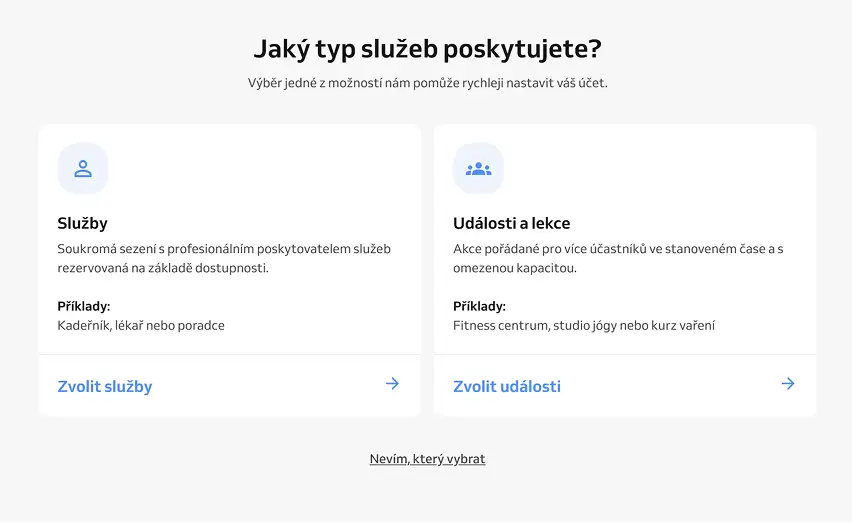
Services
This option is suitable for 1 customer per time slot
For example, this is how appointments work with:
- a hairdresser;
- a doctor;
- a cosmetologist;
- a massage therapist;
- a consultant.
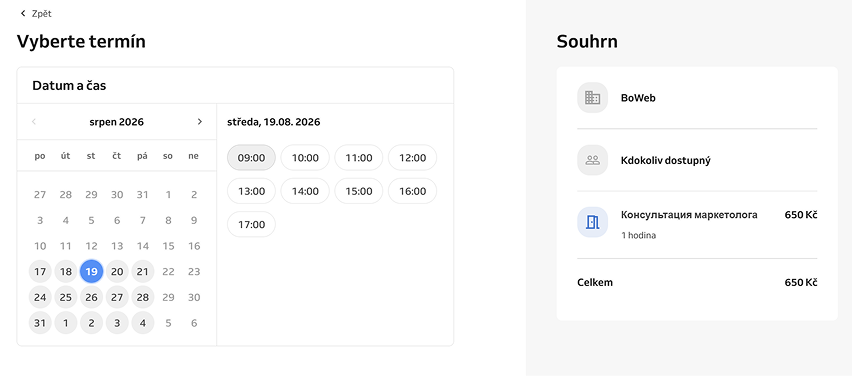
For example, there is a service called “Marketing Consultant Consultation,” and the client selects an available time slot. That time slot is reserved for them.
Events and Activities
This option is suitable when several customers can sign up for the same event at a specific time, and the number of spots can be limited. For example, only 10 people can attend this event.
For example:
- courses;
- classes;
- workshops;
- group training sessions;
- lectures;
- tours;
- VR arenas and laser tag.
This is exactly the option we chose for Funfinity VR Arena. A VR session is scheduled for a specific time with a limited number of seats. Multiple customers can reserve seats for the same session until all seats are filled.

What Does the Booking Process Look Like for a Customer in Reservio?
Once you’ve completed the setup, you’ll have your own Reservio booking page.

You can share a link to it from your website, social media, Google Business Profile, or simply send it directly to a customer.
The customer follows the usual process: selects a service or event, chooses a date and time, and provides their information.
In other words, you don’t need to develop a calendar, a booking form, and all the booking logic on the website separately.
If you already have a website, you can use Reservio as a standalone booking system and simply add a link to your site or embed the booking page.

How much does Reservio cost?
Reservio offers a free version: up to 40 bookings in 30 days and up to 100 customers. This may be enough for a small business. Note that the 30-day period is not a calendar month; Reservio counts bookings made over the past 30 days.

If you need more bookings or additional features, paid plans are available. As of August 15, 2026, prices start at 184 Kč per month + VAT when paying annually. Before purchasing, it’s best to check the current price on the Reservio website.
Another plus: Before you buy it, you can try the Pro version for free for 14 days and see for yourself whether Reservio meets your needs.
Multilingualism
When setting up our business in the Czech Republic, we appreciated that Reservio supports multiple languages. Specifically, it supports Czech, English, Spanish and German.
What else is in the system?
In addition to the calendar itself, Reservio offers the ability to create a customer database, send booking notifications via email or (for a fee) SMS, a mobile app, and other tools for managing bookings.
With paid plans, you can enable additional features, such as synchronization with external calendars and online payments.
It’s worth noting the option to create recurring events. If you hold the same class every week, you don’t need to create each date manually. You can set up a recurrence and create a schedule for the desired period all at once.

It’s really convenient for classes, workouts, and regular events.
What’s inconvenient
The first thing we noticed was that copying events isn’t very convenient.
Sometimes you need to take an existing entry, make a few changes to it, and reschedule it for a different date. It would make sense to simply copy it from the calendar. Reservio doesn’t have a feature that makes this quite so easy.
There is Repeat, but it’s a little different. It’s suitable when an event repeats on a regular basis, such as every week.
However, if you need to quickly create a similar but separate event, you’ll have to go through more steps.
For a small number of reservations, this isn’t a big deal. But if the administrator is constantly creating new events, the difference becomes noticeable.
Marketing functions—another drawback
Here we encountered a more significant limitation.
Reservio offers a loyalty program and permanentky, which can be used, for example, for discounts or a certain number of visits. However, this feature is only available if you enable Reservio’s online payments. In other words, if you have your own payment terminal, you won’t be able to automatically set up the loyalty program.
What about discount codes?
That’s where Reservio fell short for us.
For example, we wanted to implement the following mechanic:
The session lasts 30 minutes → the customer receives a code → enters it when making a reservation → gets 10 minutes for free.
There are currently no standard promo codes available in Reservio for this scenario.
We asked customer support about this specifically. They confirmed that there is currently no standard feature for creating discount codes for customers.
Instead, Reservio suggests using permanentky and other features of the loyalty program. But, as mentioned above, this is only if you have your own payment terminal.
But this isn’t always an equivalent substitute.
If you’re used to working with promo codes—for example, running promotions on Instagram, offering discounts to partners, or providing personalized codes to customers—this limitation is something to keep in mind.
What to Check Before Starting Up
You shouldn’t transfer your entire business schedule to Reservio all at once.
It’s best to make a few test reservations first.
For example, open the page on your phone and go through the entire process as a regular customer.
Check the following:
- Is it clear where to click?
- Is it easy to find the event you’re looking for?
- Is the number of available spots visible?
- Can you select the time you want?
- What happens after booking?
- Do you receive notifications?
If you’re planning group events, be sure to check how the system handles the number of seats.
For example, if there are 8 spots available for an event, multiple customers should be able to sign up for a single session, but once all spots are filled, no new reservations should be accepted.
It’s worth checking the cancellation and rescheduling policies separately.
It’s better to spend an hour on this before launch than to have to deal with these kinds of situations once you have actual customers.
Reservio: Pros and Cons
Pros
- There is a free plan;
- Up to 40 bookings in 30 days on the Free plan;
- 14-day Pro Trial;
- You can choose between individual appointments or group events;
- There is a pre-built booking page;
- Czech, English, Russian, Ukrainian, and other languages are supported;
- There is a mobile app;
- You can create recurring events;
- There is a customer database;
- You can accept payments online or in person;
- Additional integrations and features are available on paid plans.
Cons
- You must select the booking type right away; you cannot change it later on your own;
- Copying events isn’t the most convenient;
- The free plan is limited to 40 bookings per 30 days;
- Some features are only available on paid plans;
- Some marketing features are only available with Reservio’s online payment system;
- Standard promo codes for customers are not supported;тов;
Our conclusion
Reservio is a good option if you need a ready-made online booking system but don’t want to develop one yourself.
There are plenty of features available for simple appointments with specialists. The system is also suitable for group events—that’s exactly what we used for Funfinity VR Arena. But before setting it up, it’s important to choose the right booking type right away and check which features are specific to your business.